Jump to a question in this guide
- What connects a room to the outside internet?
- How do a modem, optical terminal and router differ?
- Is Wi-Fi the same thing as the internet service?
- What do download, upload and latency tell me?
- Why can the same device behave differently in another room?
- What does a wired Ethernet connection change?
- How can a mesh system help, and what does it still depend on?
- What makes a speed result useful evidence?
- How do I describe an intermittent problem without guessing its cause?
- Why are updates, accounts and network separation part of reliability?
- What should survive a power or service interruption?
- How would a fictional household distinguish a room issue from a service issue?
- What should a useful installer or provider handover contain?
- Which next question belongs with which provider?
- Wi-Fi is a local link, while internet service is an outside dependency.
- Modem or ONT, routing and wireless functions may share or separate enclosures.
- Measurements need their device, location, method and time.
- Mesh points still need a return path and primary connection.
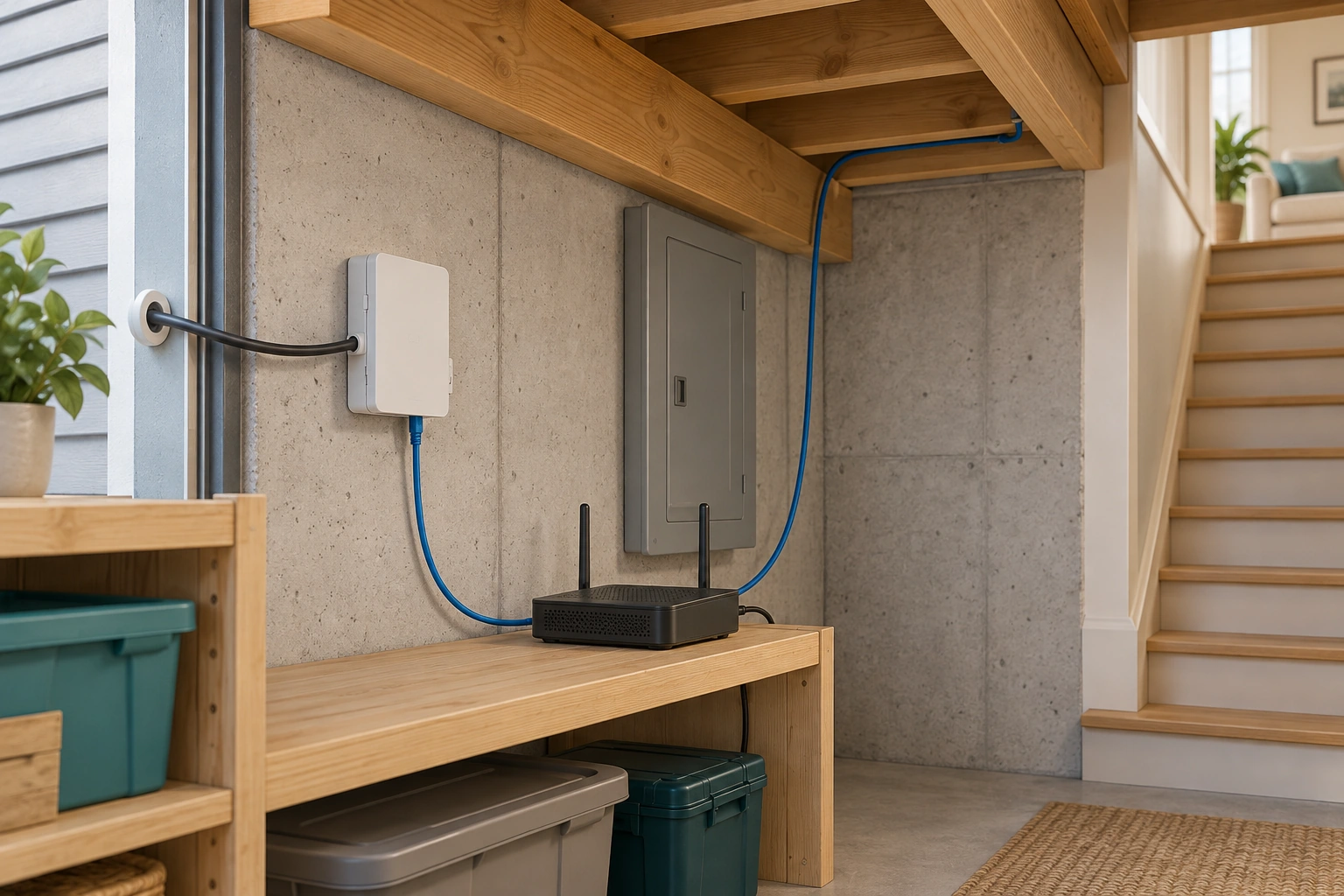
A closed wall box connects visibly to a router, while another communications lead continues beyond the frame. The two jobs help explain how an outside service becomes a local network.
About this illustration
Generic box identities and upward cable endpoint are unconfirmed; no actual provider layout, power path or installation approval. This is a conceptual teaching model, not an assessment of your home.
7 picture lessons appear beside the questions in this guide. Use them to understand the explanation, then consider what it means for your home.
What connects a room to the outside internet?
Home internet has an outside service and an inside network. The outside service brings communication to an identified entry arrangement. Provider-facing equipment handles that connection. A router directs communication between networks and helps connect the household devices. A laptop or television then reaches the router through an Ethernet cable or a wireless connection called Wi-Fi. Those jobs can share one enclosure, which is why counting boxes is less useful than naming functions.
Follow a simple task: a laptop requests an online page. The request travels through the local connection and router, then through the provider and other outside networks to the destination service. The response comes back through those dependencies. A failure or delay can involve more than the radio link in the room. Seeing the home’s wireless name does not establish that the page’s destination is reachable.
The service-entry cutaway shows separate closed provider-facing and routing equipment. Its visible cable relationship explains why both jobs matter. Actual installations may combine them or arrange them differently. The picture supplies no address-specific connection type, electrical approval or measured performance. Use the native route figure to understand the roles, then have the provider identify which physical devices perform them in the actual home.
This guide owns service entry, modem or optical terminal, router, local wired/wireless connections and useful reliability evidence. Smart automation owns what a sensor, rule and controlled device do with those connections. The outage guide owns household alternatives when power or communication fails. Keeping those questions connected helps the reader without treating every disconnected lamp or interrupted call as the same problem.
Provider-facing and routing jobs meet at the entry
A closed wall box connects visibly to a router, while another communications lead continues beyond the frame. The two jobs help explain how an outside service becomes a local network.
Numbers identify the parts explained below.
- Closed wall box
Conceptual provider-facing interface; actual modem/ONT identity needs confirmation.
- Router
Directs supported communication between local and outside networks.
- Continuing lead
Its off-frame destination remains unknown in this illustration.
What does this illustration leave out?
Generic box identities and upward cable endpoint are unconfirmed; no actual provider layout, power path or installation approval. This illustration explains an idea. It is not an installation guide.
Which devices and routes perform these jobs in this home?
Explore this with HomeAI ↗Opens an editable question. Nothing is sent until you choose to send it.A request leaves the room and returns
The local client link, routing, provider-facing interface and outside destination perform different jobs. Some physical boxes combine roles.
Numbers identify the parts explained below.
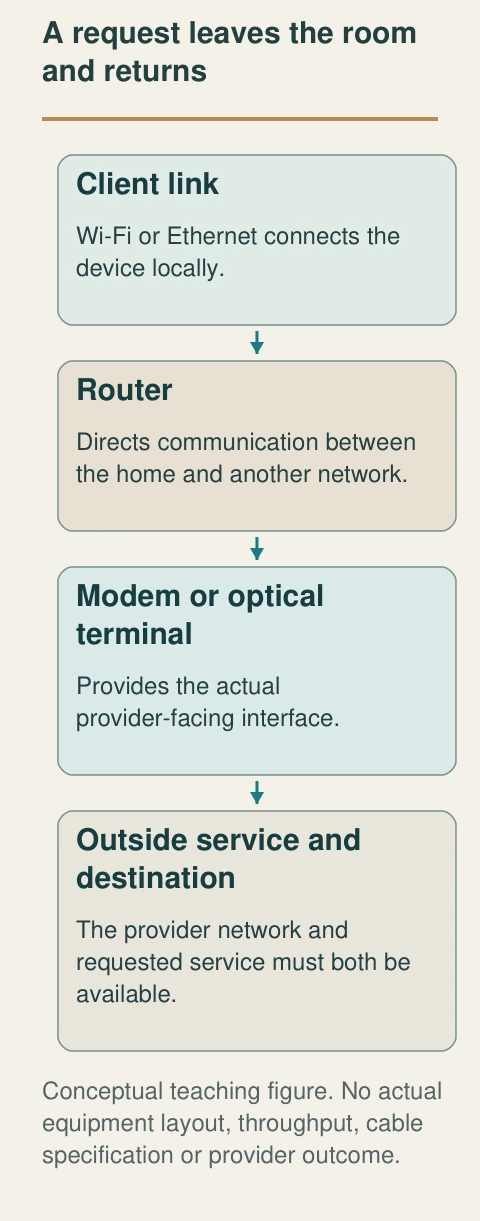
- Client link
Wi-Fi or Ethernet connects the device locally.
- Router
Directs communication between the home and another network.
- Modem or optical terminal
Provides the actual provider-facing interface.
- Outside service and destination
The provider network and requested service must both be available.
What does this illustration leave out?
No actual equipment layout, throughput, cable specification or provider outcome. This illustration explains an idea. It is not an installation guide.
Which boxes perform these functions in this home?
Explore this with HomeAI ↗Opens an editable question. Nothing is sent until you choose to send it.Read the complete figure
A request leaves the room and returns
The local client link, routing, provider-facing interface and outside destination perform different jobs. Some physical boxes combine roles.
- Client link
- Wi-Fi or Ethernet connects the device locally.
- Router
- Directs communication between the home and another network.
- Modem or optical terminal
- Provides the actual provider-facing interface.
- Outside service and destination
- The provider network and requested service must both be available.
What remains unknown: No actual equipment layout, throughput, cable specification or provider outcome.
A useful question: Which boxes perform these functions in this home?
How do a modem, optical terminal and router differ?
A modem provides the interface between a particular outside service and the home’s equipment. With fibre service, an optical network terminal, often abbreviated ONT, handles the fibre-facing conversion. A router manages communication between the home network and another network. An access point provides the wireless connection for compatible local devices. Providers may combine a modem, router and access point in one gateway, or separate some jobs among several boxes.
The TELUS article explains its own combined modem/router equipment and describes fibre arrangements with a separate ONT. That named example helps unpack a familiar provider word. It does not establish that every Canadian fibre home contains the same boxes or that a device called modem by one provider performs exactly the same roles elsewhere. Keep the actual model names with the provider’s explanation.
A closed case can hide several functions without being defective or unusually complicated. When support asks which device is involved, give the safely available identity and describe its ordinary location. Ask which device connects to the outside service, which routes the household traffic and which supplies Wi-Fi. This creates a useful map without disconnecting cables to determine what stops working.
Power is another relationship to record. Separate boxes can require separate supplies, and combined equipment can make several functions unavailable together when it stops. This is relevant to an outage plan but does not authorize a backup connection. Obtain the provider’s actual supported arrangement and matching electrical advice. A generic modem photograph or a brochure claiming a powerful router cannot establish this home’s end-to-end service.
Is Wi-Fi the same thing as the internet service?
Wi-Fi is a local wireless communication link using radio. Internet service is the outside connection the home purchases or receives. A laptop can be associated with a Wi-Fi network while the upstream internet connection is unavailable. A device connected by Ethernet can reach the outside service without using Wi-Fi for that local link. These distinctions explain why the phrase internet is down needs a little more description.
Ask what actually happened. Did the home network name disappear? Did one device fail to join? Did several connected devices lose access to outside services? Did only one application stall? Those are different observations. Record them in ordinary words, including location and time, without turning the first symptom into a diagnosis. An icon can summarize a limited state rather than every link in the task.
The two-room picture shows a router, nearby client and another client across a dividing wall. It makes the local radio relationship visible as a question about geometry. It does not draw coloured coverage zones or promise a signal level. The native figure separates the client-to-router link from the router-to-provider link so that a wireless complaint can be discussed at the right boundary.
A provider might find that its service reaches the gateway as expected while a particular room still has a local connection problem. Both statements can be true. Likewise, strong local Wi-Fi does not fix an outside-service interruption. Ask support which boundary its finding covers, what conditions were examined and what other question remains. This avoids replacing a specific unresolved issue with the broad assertion that the internet tested fine.
The local link and outside service are different
- Wi-Fi associationA client’s local wireless connection.
- Router/provider linkThe next route toward the outside service.
- Destination taskThe actual page, call or transfer completing.
An icon or illustration does not establish all three.
Further reading: Rogers · Getting to know your WiFi; TELUS · Modems explained.
What do download, upload and latency tell me?
Download describes data travelling toward the household device. Upload describes data travelling away from it. Their rates are commonly expressed in megabits per second, written Mbps. A task can use both directions: receiving meeting video and sending the household’s own video are separate flows. Comparing only a large download headline can leave the task’s other needs unexplained.
Latency concerns delay in communication. A connection can move a substantial amount of data while still having delay that matters to an interactive task. CRTC’s broadband project names download, upload and latency as separate measured elements. That establishes useful categories for a support discussion; it does not provide a universal acceptable result for every application or a diagnosis from one number.
The subscribed plan, an advertised maximum, an equipment capability and a measured result are different facts. Keep each label clear. A client’s supported wireless generation does not establish the outside plan; the plan does not prove the speed in a distant room. A measurement needs its method, location, device, connection type and time before another result can be meaningfully compared with it.
Describe the task before shopping for a higher headline speed. Is the concern an interrupted meeting, a slow transfer, inconsistent room coverage or several devices working at once? Ask the provider what evidence would distinguish those conditions for the actual service. This article offers no minimum plan, bandwidth-per-person formula or product ranking. National access targets and historical programme findings are not guarantees that a particular household currently receives that result.
Units also need to travel with a reported number. A plan expressed in megabits per second and an application reporting a file amount in bytes describe different quantities. Do not compare their numbers by appearance or turn a file-transfer time into a service verdict without the method and conditions. Ask support to explain the actual display and measurement point in familiar terms. The purpose is to know whether two records concern the same quantity and route, not to create an owner benchmarking formula from incomplete information.
Why can the same device behave differently in another room?
The wireless link depends on the relationship between the access point and client. Their separation, the building materials and objects between them, interference, competing traffic and the equipment’s capabilities can matter. A finished room photograph cannot quantify those effects. The relevant question is the actual experience at the intended location under stated conditions, rather than whether the house looks too large for one router.
The room cutaway puts a wall and furnishings between the distant laptop and router. Its lesson is the presence of a different local path, not a measured loss through that wall. No number of illustrated walls becomes a coverage rule. Different construction, equipment and surroundings can produce different outcomes, so retain the actual room and task in the record.
Compare observations without making an uncontrolled experiment sound conclusive. If normal use was reliable near the router but inconsistent in a back room, record that pattern and the conditions known. Other activity, client state or the destination may also have changed. A qualified support plan can propose suitable comparisons while accounting for those alternatives. The pattern is evidence to investigate, not proof that a wall is the sole cause.
Avoid moving provider equipment, disturbing the service cable or changing radio settings from a generic diagram. Ask the provider about approved placement and the actual equipment’s ventilation, supply and connection limits. An open shelf can be useful conceptual context, but this guide supplies no prescribed mounting height, clearance or relocation instruction. The desired result is a supported room-level explanation and plan, with any measurement limits kept visible.
A different room has a different local path
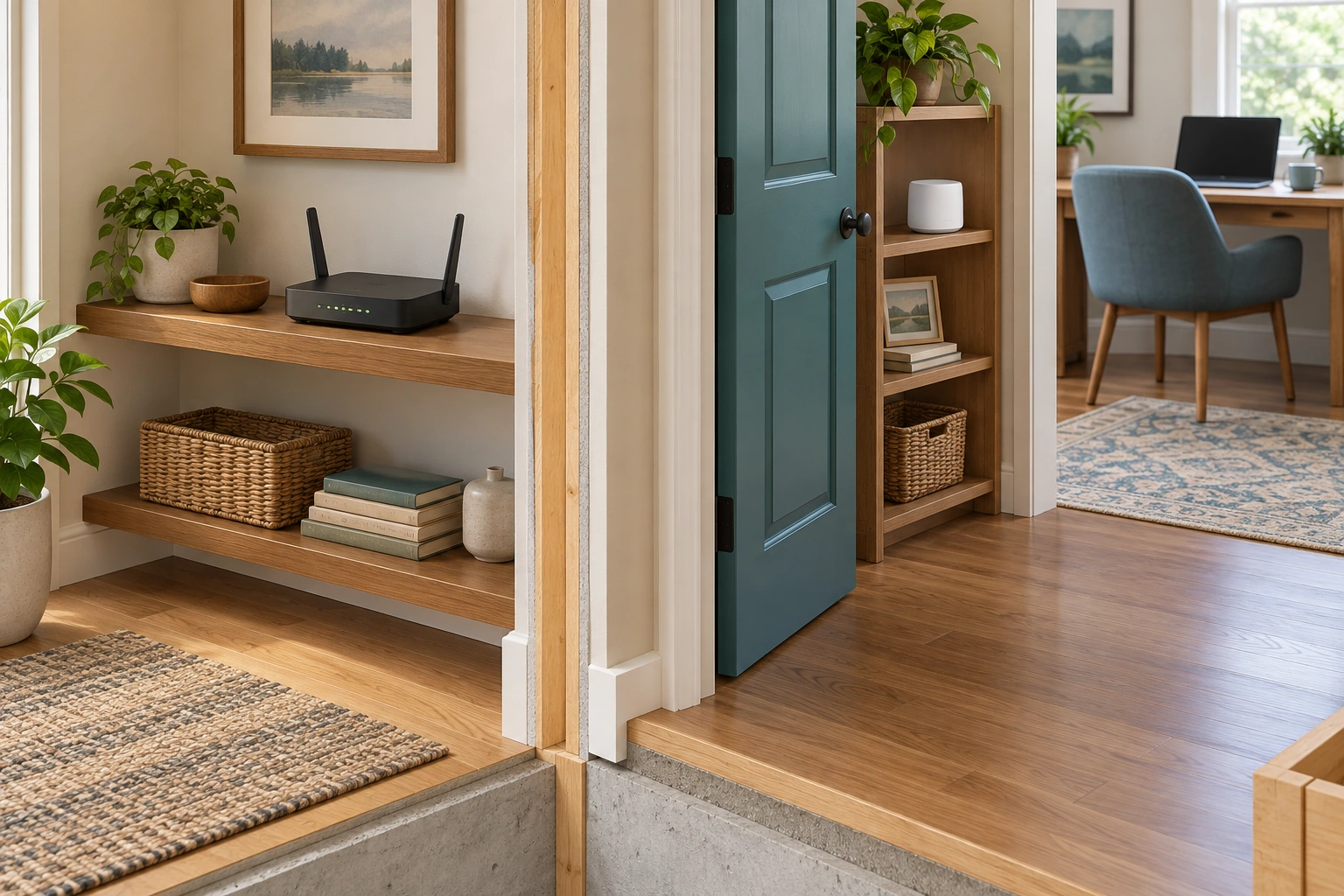
The router sits in one room while laptops occupy a nearby desk and an adjoining space. Walls and furnishings change the relationship between each client and the local wireless source.
Numbers identify the parts explained below.

- Router on shelf
Provides the conceptual local wireless source.
- Nearby client
Its location is one possible local relationship.
- Adjoining room and client
The wall and greater separation introduce a different relationship, not a diagnosed cause.
What does this illustration leave out?
No signal level, coverage zone, measured loss or room-performance result is shown. This illustration explains an idea. It is not an installation guide.
Which task and client were assessed at the intended location?
Explore this with HomeAI ↗Opens an editable question. Nothing is sent until you choose to send it.What does a wired Ethernet connection change?
Ethernet provides a physical local communication link between compatible equipment. It changes the client’s local path rather than replacing the provider’s outside service. A laptop connected by a suitable supported cable can avoid using Wi-Fi for that segment. It still depends on the router, provider-facing equipment, outside network and destination. A cable is therefore a useful alternative local link, not proof that every internet problem has been removed.
The close desk picture follows one visible Ethernet cable from router to laptop. The closed housings keep attention on the route and its jobs. No concealed wiring, electrical supply or installer procedure is shown. The native comparison explains what differs between this local path and the wireless path while keeping their shared upstream dependencies intact.
A provider may use an appropriately supported wired comparison to reduce some wireless variables in an assessment. Ask what device and method the comparison requires and how its result should be interpreted. An older client, unsupported adapter, cable issue or other bottleneck can still limit the observation. A single wired number does not automatically establish the maximum capability of the service or the whole home network.
Permanent cabling, concealed routes and equipment configuration require an appropriate design and qualified installation scope. Do not run a cable across an unsafe walking route or open wall assemblies to imitate the picture. If an existing data outlet is involved, have its actual connection and purpose identified. An unused-looking wall plate does not prove a ready Ethernet route to the router, and a seller’s description does not replace that finding.
Ethernet changes the local segment
One continuous visible communications cable links the closed router and laptop along the desk. This local physical path differs from Wi-Fi while keeping the provider and destination as outside dependencies.
Numbers identify the parts explained below.
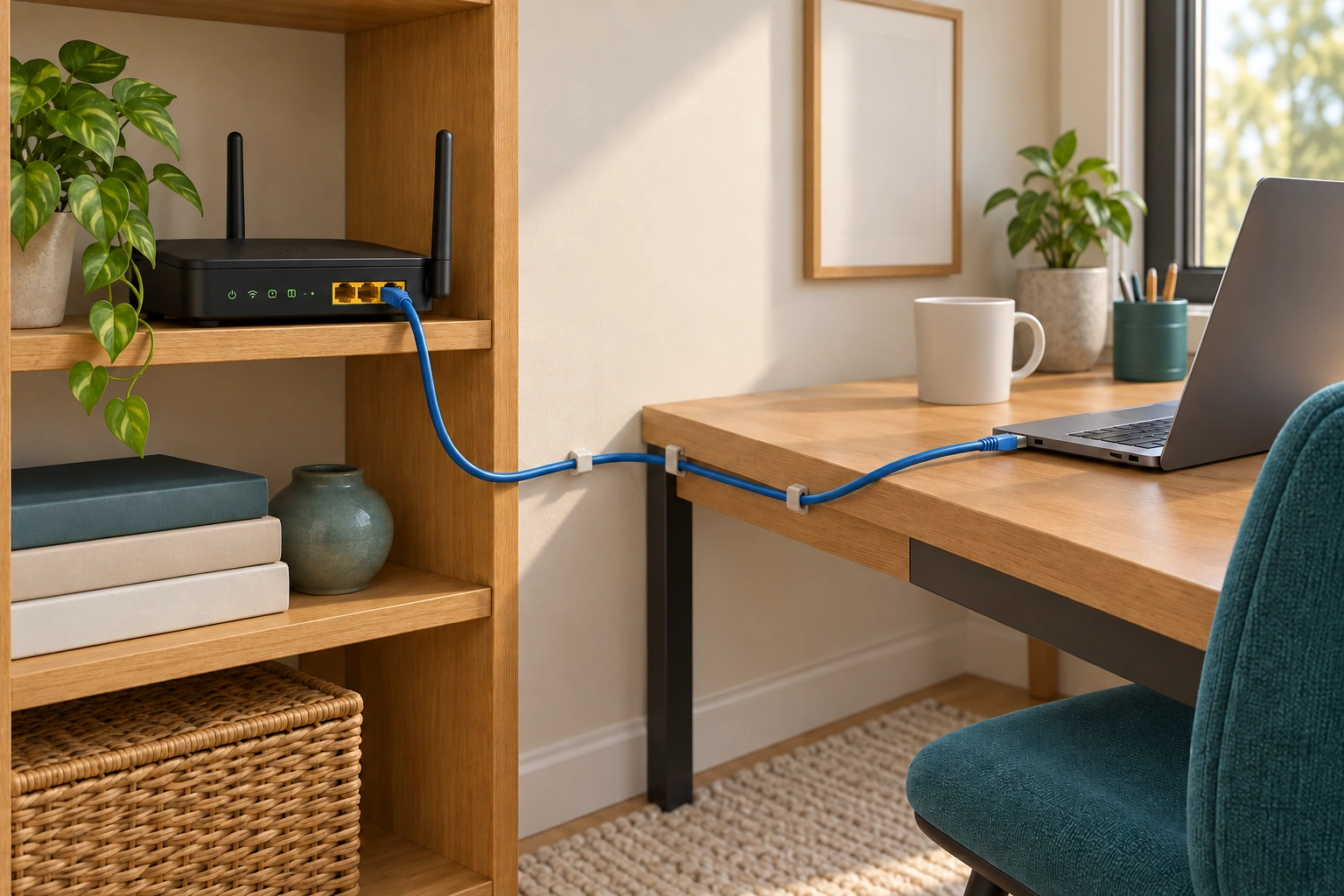
- Router port
One end of the conceptual local communications link.
- Continuous cable
Shows a physical client route rather than a wireless association.
- Laptop connection
The client still depends on upstream equipment and service.
What does this illustration leave out?
No cable specification, concealed installation, speed result or full-service guarantee. This illustration explains an idea. It is not an installation guide.
What boundary does the actual wired comparison assess?
Explore this with HomeAI ↗Opens an editable question. Nothing is sent until you choose to send it.What changes with Ethernet?
- Wired local segmentA supported physical client connection.
- Wireless local segmentA supported radio client connection.
- Shared upstream dependenciesRouter, provider-facing equipment, outside service and destination still matter.
No cable installation or maximum-speed test supplied.
Further reading: Rogers · Getting to know your WiFi; TELUS · Modems explained.
How can a mesh system help, and what does it still depend on?
A mesh Wi-Fi arrangement uses several network points rather than one wireless source. A client connects through an available point, and that point needs a route back toward the primary network connection. That return connection is often called backhaul. It can use wireless communication or an appropriate wired arrangement, depending on the exact system. A point that is nearer the laptop still needs its own working upstream route.
Google’s named family illustrates multiple points and a primary-router dependency. The whole local arrangement can lose its outside route if the primary connection is unavailable. That limited relationship is the lesson adopted here. Advertising about self-healing or wider coverage does not establish the actual path, resilience or result in an arbitrary house. Exact models, supported topology and current instructions matter.
The two-room mesh picture shows a primary device, another point and a farther client. It deliberately avoids imaginary radio rays or coverage colours. The companion figure draws client, point, return path and primary connection as separate jobs. Ask the provider which connection each point actually uses and how the intended room’s performance was assessed. Counting nodes does not measure the quality of that route.
A mesh proposal should connect the observed problem with a specific intended improvement. More equipment may add placement, power, update and support responsibilities. It is not automatically the right response to an outside-service fault or a single broken client. Keep the scope and expected verification clear before the device count becomes the goal. This guide supplies no preferred mesh kit, point spacing, house-size rule or installation instruction.
The return path deserves its own row in the equipment map. Label the point, its power source, its supported connection toward the primary device and the rooms it is intended to serve. Keep any field left unverified visible. A nearby point and a successful client association can coexist with a weak or unavailable upstream relationship. That is why a picture of several installed nodes is a record of presence, while a supported assessment of their actual routes answers a different question. The latter should state conditions rather than merely count the boxes.
A nearby point still needs its own route
A main router and separate point occupy adjoining spaces, with a laptop farther into the second room. The added point can support a local link only within its actual network and return-path arrangement.
Numbers identify the parts explained below.
- Main router
The primary connection has its own power and provider dependencies.
- Additional point
Adds a local network role; proximity is not a performance finding.
- Farther client
Its actual connection and intended task need supported assessment.
What does this illustration leave out?
No wireless backhaul ray, point spacing, supported topology or measured coverage is shown. This illustration explains an idea. It is not an installation guide.
How does the actual point reach the primary connection?
Explore this with HomeAI ↗Opens an editable question. Nothing is sent until you choose to send it.A nearby mesh point still needs a return path
An additional point serves a local client while depending on its supported backhaul and primary connection.
Numbers identify the parts explained below.
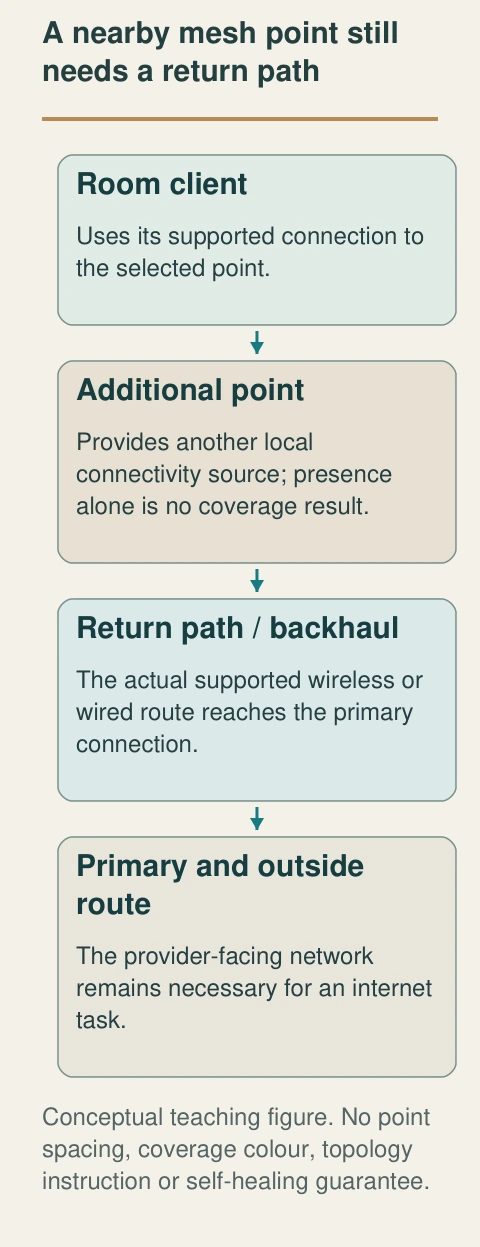
- Room client
Uses its supported connection to the selected point.
- Additional point
Provides another local connectivity source; presence alone is no coverage result.
- Return path / backhaul
The actual supported wireless or wired route reaches the primary connection.
- Primary and outside route
The provider-facing network remains necessary for an internet task.
What does this illustration leave out?
No point spacing, coverage colour, topology instruction or self-healing guarantee. This illustration explains an idea. It is not an installation guide.
How is this point’s actual return path supported and assessed?
Explore this with HomeAI ↗Opens an editable question. Nothing is sent until you choose to send it.Read the complete figure
A nearby mesh point still needs a return path
An additional point serves a local client while depending on its supported backhaul and primary connection.
- Room client
- Uses its supported connection to the selected point.
- Additional point
- Provides another local connectivity source; presence alone is no coverage result.
- Return path / backhaul
- The actual supported wireless or wired route reaches the primary connection.
- Primary and outside route
- The provider-facing network remains necessary for an internet task.
What remains unknown: No point spacing, coverage colour, topology instruction or self-healing guarantee.
A useful question: How is this point’s actual return path supported and assessed?
What makes a speed result useful evidence?
A measurement is most useful when its context travels with it. Record the date and time, device, location, wired or Wi-Fi connection, method and relevant concurrent activity. Preserve the actual result rather than rewriting it as fast or slow. If an important condition is unknown, say so. Another person can then understand what the result describes and which comparison would address the remaining question.
CRTC distinguishes measurement of the service near the home’s entry from experience affected by internal network conditions. Its project page also describes dated research phases. Those national findings are useful background about measurement scope; they are not a fresh test of the current house or provider plan. A result from a volunteer project years ago should not become a present guarantee for an address.
For provider-supported testing, ask which boundary the method measures and which conditions should remain unchanged. A repeatable method can make a comparison more informative, while still having limitations. The goal is to reduce the uncertainty that matters to the complaint, not to collect the highest possible number or keep testing until one screenshot appears reassuring.
This guide does not initiate network tests, sign into equipment or supply a command sequence. Follow the provider’s current supported guidance for the exact service, accounting for other household needs and privacy. Do not interrupt essential monitoring or work to improve the sample. Retain a held or inconclusive result honestly. A missing measurement is a task to resolve, rather than evidence that either the provider or the household equipment is at fault.
Do not collapse several measurements into one unexplained average. A provider may need the event pattern, individual times and particular locations to understand inconsistency. One unusually favourable result can coexist with a recurring problem under other conditions. Retaining the original observations also makes a later before-and-after comparison reviewable: the reader can see what changed and what did not. If the method or device changed, mark that difference instead of attributing every numerical improvement to the proposed work. A comparison is strongest when its actual boundary is clear.
A speed number needs its measurement boundary
A plan, a local-link capability and a measurement are different records. Keep method and conditions with the result.
Numbers identify the parts explained below.
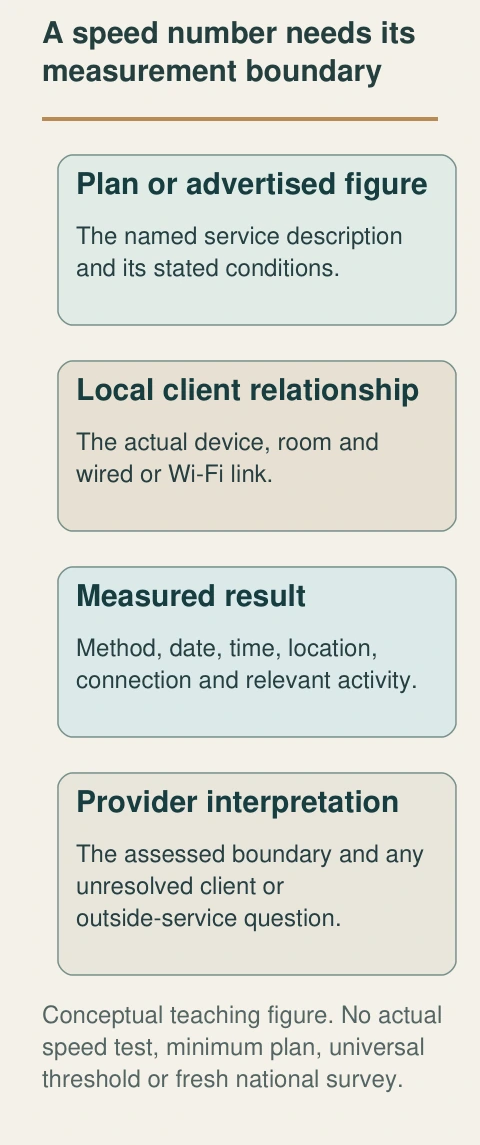
- Plan or advertised figure
The named service description and its stated conditions.
- Local client relationship
The actual device, room and wired or Wi-Fi link.
- Measured result
Method, date, time, location, connection and relevant activity.
- Provider interpretation
The assessed boundary and any unresolved client or outside-service question.
What does this illustration leave out?
No actual speed test, minimum plan, universal threshold or fresh national survey. This illustration explains an idea. It is not an installation guide.
Are these results measuring the same route and conditions?
Explore this with HomeAI ↗Opens an editable question. Nothing is sent until you choose to send it.Three records with different meanings
- Subscribed or advertisedThe named plan and stated conditions.
- MeasuredActual method, device, location, time and result.
- AssessedProvider interpretation and its remaining limits.
Historical programme results do not measure this home.
Further reading: CRTC · Internet performance and reliability; CRTC · Measuring Broadband Canada project.
Read the complete figure
A speed number needs its measurement boundary
A plan, a local-link capability and a measurement are different records. Keep method and conditions with the result.
- Plan or advertised figure
- The named service description and its stated conditions.
- Local client relationship
- The actual device, room and wired or Wi-Fi link.
- Measured result
- Method, date, time, location, connection and relevant activity.
- Provider interpretation
- The assessed boundary and any unresolved client or outside-service question.
What remains unknown: No actual speed test, minimum plan, universal threshold or fresh national survey.
A useful question: Are these results measuring the same route and conditions?
How do I describe an intermittent problem without guessing its cause?
Intermittent means the symptom appears and disappears. Begin with a small event account: what task was attempted, on which device, where and when, and what actually happened. Add whether other ordinary devices or tasks were observed at the same time. Keep unknowns unknown. A report that the television continued streaming while one laptop stalled can narrow the conversation without proving a particular cause.
Consider different boundaries. A client issue may affect one device. A local wireless issue may relate to a room or access point. A gateway or provider issue may affect multiple tasks. A destination problem may concern one service despite other internet activity continuing. These are organizing possibilities, not a probability ranking or a remote diagnosis. The provider should select suitable investigation from the actual account.
Preserve the original timing even if equipment later restarts or service returns. Restoration is an observed change, not an explanation of why the interruption occurred. Ask whether available device or provider logs cover the event and what their timestamps mean. An absence of a logged fault may reflect the log’s scope rather than proof that the symptom was imagined.
Avoid repeated factory resets, improvised cable changes or security disabling as a generic response. Those actions can erase useful state or disrupt other functions. Obtain a model-matched support plan and retain changes with their dates. If support establishes one limited finding, keep any remaining room, client or destination question beside it. A broad resolved ticket should not silently erase a condition that was never assessed.
When several household members report problems, keep their accounts linked without making them identical. One may describe a phone losing the network name, another a browser waiting for one page and another a video call ending. Their times may overlap or differ. A shared summary can identify the common period while preserving the distinct symptoms and devices. This helps support choose the next question and avoids an exaggerated claim that every device lost every service. No household member needs to reproduce an interruption for the account to be useful.
Why are updates, accounts and network separation part of reliability?
Connected equipment has software and administrative settings as well as physical links. Its support lifecycle, updates and account access can affect continued use. Keep the manufacturer’s current update and support information with the model record. An old device that still lights up does not establish ongoing security support, and a recently updated client does not prove every network component is current.
Get Cyber Safe advises strong credentials, updates and provider help with a separate network for smart devices. That security advice needs an actual configuration suited to the household equipment. Some systems require devices to discover or communicate with one another locally. Ask support how the proposed separation affects those functions. A guest-network label alone does not establish either complete isolation or compatibility.
The owner file should name the responsible account holder and recovery contact without copying passwords, recovery codes or private network details into a public guide or shared screenshot. Retain sensitive settings in an appropriate private record. A support request can describe a device and symptom while omitting credentials. If a screenshot contains personal information, prepare a suitable limited version for the intended recipient.
Do not disable encryption, expose administrative access or apply an unfamiliar configuration to make a device join more easily. Use the exact provider and manufacturer support path. Record a planned update or configuration separately from one completed and verified. The purpose is a maintainable, understood arrangement, not a promise that software changes remove every failure or that a separate wireless name certifies security.
What should survive a power or service interruption?
List functions rather than assuming the router represents them all. Local file access, outside internet, internet telephone, remote cameras and smart controls can depend on different devices and services. A router with power may preserve some local communication while losing outside connectivity. A phone with charge may still depend on a network. Each desired function needs its own explained arrangement and alternative.
The power-bar and UPS companion owns the distinction between stored supply, connected loads and runtime limits. Here the relevant question is which communications devices actually require power and which outside-service limitations remain. Ask the provider what its actual service needs during an outage. Keep any supplied backup scope and user instructions model-specific rather than borrowing another house’s demonstration.
For urgent household needs, retain contacts and information routes offline. The broader outage guide explains household contingencies, while care teams and responsible service providers address medical or accessibility needs. Do not treat a consumer network diagram as an emergency-call continuity finding. Do not make test calls to emergency numbers or deliberately interrupt an essential service to check a theory.
When service returns, record what resumed and what still requires attention. Restored internet does not establish that every recording, upload, notification or automation completed during the interruption. Each task needs its own evidence. Keep the network event separate from the consequences so a missing notification can be investigated at the correct layer instead of becoming an unsupported claim that the whole network remained unavailable.
How would a fictional household distinguish a room issue from a service issue?
Dev and Robin are fictional owners. Video meetings in a back bedroom have been inconsistent, while ordinary use near the gateway has seemed reliable. They do not have matched measurements, and the two observations occurred at different times. A faster advertised plan is suggested, but there is no scoped finding yet. The useful first question is which part of the actual route needs investigation.
They write the room, client, task and approximate event times. They ask the provider to identify the service-entry equipment and local wireless functions. They request a supported assessment that distinguishes the outside service from the local room experience, including the conditions and limits of any comparison. They do not relocate the provider connection or factory-reset everything to create a clean-looking starting point.
In the invented support ticket, the provider records a wired assessment at the gateway and explicitly excludes the back-bedroom wireless client. Robin’s earlier report concerns that room during a meeting, so the ticket does not answer the same question. Dev and Robin request a supported room/client assessment with the intended task and relevant conditions retained. They postpone buying a higher advertised service tier or mesh kit until the proposal explains which unresolved link it addresses. This does not establish a measured speed, fault or improvement.
Suppose a later report clarifies the local route but leaves the destination service outside its scope. The owners preserve that limit, retain the completed work and note the remaining task. Their original observation stays an observation. This case supplies no actual measurement, improved speed, suitable product, diagnostic certainty or verified service outcome. It demonstrates how a household can move from a vague complaint to a reviewable support question.
What should a useful installer or provider handover contain?
Ask for a map of the functions and exact equipment: outside entry, provider-facing interface, router, wireless points and relevant wired routes. Identify who supplies and supports each item. Add the service description and its date, the ordinary owner instructions and any agreed room or task assessment. The map should describe the actual property rather than a stock diagram copied from a brochure.
Keep intended layout, completed work and observed performance separate. A plan names what should be installed. A completion record describes what was done. A performance finding describes the method, location, conditions and result actually assessed. None should silently replace another. If a data outlet was not traced or a room was not tested, preserve that specific uncertainty beside the otherwise complete handover.
For a buyer or new owner, ask about rental or supplied equipment, account responsibility and the provider’s actual transfer arrangements. This guide does not claim that service, credentials, contracts or device ownership automatically transfer with the house. Keep those administrative questions with the responsible provider and transaction professional. A seller can report its experience without guaranteeing the next household’s plan or equipment.
The practical outcome is a file another support person can understand without being present at the original installation. Use familiar room names, exact model identities and useful dates. Keep private credentials separate and essential contacts available offline. When equipment, household tasks or service changes, update the relevant boundary instead of assuming an old normal-use observation still establishes the new arrangement.
A good handover includes recovery access as a responsibility rather than a public secret. Identify who can contact the provider, where the current manual is kept and who maintains the private administrative record. An installer leaving and an account holder moving out are meaningful changes to that arrangement. Ask how support continues without requiring an informal password exchange. The result should be a maintainable relationship between people, equipment and service, alongside the physical network map. This administrative clarity does not itself certify network security or transfer a contract.
Which next question belongs with which provider?
For service entry and outside connection, begin with the communications provider and the actual service account. For local wireless placement, mesh relationships or supported network settings, use the provider or appropriate network specialist with the exact equipment. For permanent electrical supply concerns, use a qualified electrical professional. For concealed data routes, obtain an appropriate installation scope. Several roles can cooperate without one finding covering them all.
CRTC directs customers to their service provider first about service problems and identifies the CCTS dispute route if a response is unsatisfactory or unresolved. That is a consumer-support route, not a diagnostic test or a promised remedy in this case. Keep the event account, relevant ticket and findings so the actual issue can be described accurately. No complaint or message is sent by this article.
The smart-home companion explains sensors, automation rules and local/cloud dependencies after the network roles are understood. The power and outage companions explain supply limits and household alternatives. The home-care record provides a place for dated equipment, observations, requested work and completed findings. Follow the canonical question that remains, rather than asking one article to become a network, electrical, medical and automation certification.
A reader should finish able to follow a request from the device through the local link, router, provider-facing equipment and outside service. They should also be able to say what a measurement covers, what remains unknown and who can address it. The diagrams supply conceptual relationships. Actual performance, security and continuity remain the results of the stated equipment, conditions, professional work and evidence.
Keep learning about the connected parts
- A power outage plan for heating, water and communications
- Home backup batteries: what stays on and for how long?
- Leak sensors and automatic shutoff: understand detection, valve action and response
- Build a home-care record that the next person can understand
- Smart-home automations: follow the sensor, rule and physical result
- Electrical renovation records: what was actually checked?
- Power bars, surge protection and UPS: understand the different jobs
Canadian context and authorities · Visual atlas · Learning labs
Practice the distinction.
Dev and Robin investigate a back-bedroom meeting problem
Fictional case: different room experiences were reported at different times; matched measurement and cause finding are absent.
Reported observations
- The invented provider ticket covers a wired gateway assessment only.
- The back-bedroom wireless client and its meeting task are explicitly outside that assessment.
- The household does not stage a service interruption or assume a new plan or mesh kit will solve the issue.
Compare the explanations
Expand each possibility to see the evidence needed to distinguish it. Similar symptoms can have different mechanisms.
A local path or client issue matters
Room geometry, equipment and conditions need suitable assessment.
Provider-supported comparison with device, location, connection and limits.
An upstream or destination condition matters
The complete task extends outside the home network.
Scoped service findings and event timing, with destination limits.
A useful next question
Request a supported room/client assessment and ask each proposal which unresolved link it addresses before buying a change.
No actual speed, diagnosis, coverage improvement, product recommendation or continuity result.
Know what the words mean.
- ONT
- Optical network terminal; the provider-facing fibre interface in an identified arrangement.
- Router
- Equipment directing communication between the home network and another network.
- Wi-Fi
- A local wireless radio connection; separate from the outside internet service.
- Backhaul
- The return connection from an additional network point toward the primary network route.
- Latency
- Communication delay; a different measurement from data-transfer rate.
Questions to bring
to the conversation.
- Which devices perform the actual service-entry and routing jobs?
- Which task, room, device and time describe the symptom?
- What boundary and conditions does the measurement cover?
- Which local and external dependencies remain unverified?
- Who supports the named equipment and proposed change?
Separate a showing observation, an existing record and a new professional assessment. Unknown means a question remains; it does not automatically mean a defect.
Use the evidence planner ↗Go to the source.
Original HomeAI explanation informed by these public references. Sources support the underlying guidance; they have not reviewed or endorsed HomeAI. Diagrams are conceptual, and calculator outputs depend on your inputs.
Complete current substantive CRTC, TELUS embedded article, Rogers, Google mesh and Get Cyber Safe bodies personally read October 14. Dates, named-provider geography and extraction/access holds retained. Rogers generation/protocol table excluded because apparent errors; linked project reports and exact model/setup pages not independently adopted. No network configuration, password disclosure, speed test, service interruption, electrical/data installation, product recommendation or measured performance supplied. Fictional case and conceptual routes remain distinct from actual findings.
Publication & source review
First published .
Sources reviewed .
Have a question about your home?
Start with the symptom, timing and what you have observed.
Ask HomeAI